Decision Making Statements in Python
Statements that are used to control the flow (execution order) of a Python program
are called decision making or conditional statements.
Based on the result of a condition (True or False), certain statements are executed
or skipped.
Python provides three types of decision (conditional) statements:
- if
- if-else
- if-elif-else
In decision making statements, relational operators are used to
evaluate conditions.
The result of a condition is either True or False
(Boolean type).
To understand program logic clearly, Algorithms and
Flowcharts are very useful.
Therefore, let us first learn about Boolean data type, relational operators,
algorithms, and flowcharts.
Boolean Data Type
The Boolean data type has only two values: True and False.
In Python, the keywords
True and False are used to represent
Boolean values.
Boolean values are mainly used in conditions.
# Example of Boolean values in Python
is_pass = True
is_promoted = False

print("Is he passed?", is_pass)       # Output: Is he passed? True
print("Is he promoted?", is_promoted) # Output: Is he promoted? False
Relational Operators
A relational operator checks the relationship between two operands.
The result will be either True or False.
Python provides six relational operators, as shown below.
| Operator | Description | Example |
|---|---|---|
| == | Equal to | a == b |
| != | Not equal to | a != b |
| > | Greater than | a > b |
| < | Less than | a < b |
| >= | Greater than or equal to | a >= b |
| <= | Less than or equal to | a <= b |
The relational operators shown above are used in conditions.
One important thing to note is that the
== operator is used for comparison.
If we use the = operator, it becomes an assignment operator.
For example, a = b assigns the value of b to a.
In most programming languages, single = is used for assignment
and double == is used for comparison.
Note:
Relational operators are always used in conditions.
Example: In 10 > 5, since 10 is greater than 5,
the result of the condition is True.
Algorithm
An algorithm is a set of step-by-step instructions used to solve
a problem or complete a task.
Algorithms are written in an easy-to-understand way using natural language
and programming keywords.
This form is called pseudocode.
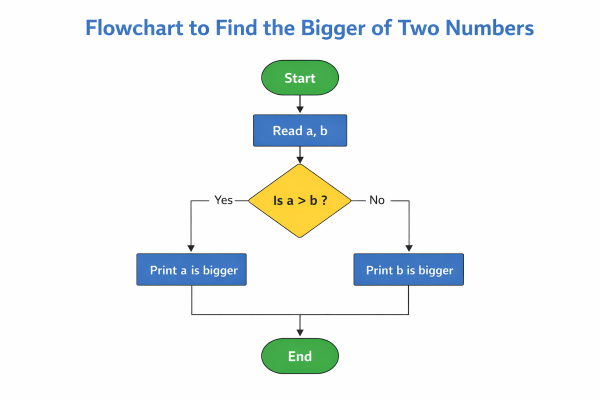
Algorithm to find the bigger number between two numbers
Step 1: Start
Step 2: Read two numbers a and b
Step 3: If a > b
            Print "a is bigger"
Step 4: Else
            Print "b is bigger"
Step 5: Stop
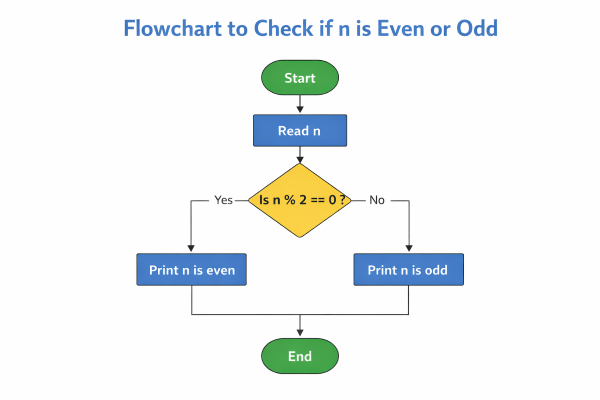
Algorithm to find whether a given number is even or odd
Step 1: Start
Step 2: Read number n
Step 3: If remainder is 0 when n is divided by 2
            Print "n is even"
Step 4: Else
            Print "n is odd"
Step 5: Stop
Uses of Algorithms and Pseudocode
- Helps plan the logic step by step before writing code
- Reduces errors by making the logic clear in advance
- Makes it easy to explain logic to team members
- Helps in drawing flowcharts
Flowchart
A flowchart is a diagrammatic representation of a problem solution
or program logic.
Special symbols are used to draw flowcharts, as shown below.
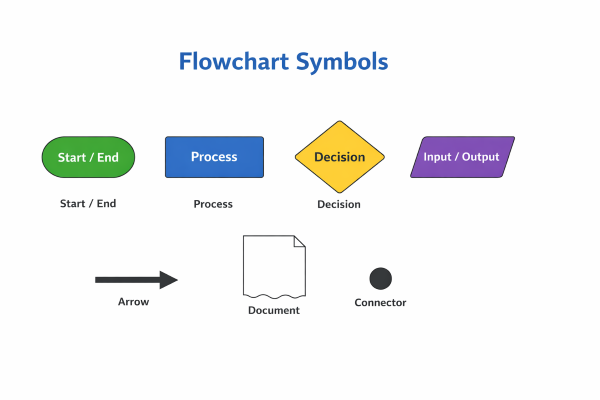
| Symbol | Name | Description | Example Usage |
|---|---|---|---|
| Oval | Start / End | Represents the beginning or end of a flowchart | Start, End |
| Rectangle | Process | Represents a calculation or instruction | a = b + c |
| Diamond | Decision | Used for making decisions based on a condition | a > b ? |
| Parallelogram | Input / Output | Used to take input or display output | Read a, Print sum |
| Arrow | Flow Line | Shows the direction of control flow | Next step |
| Circle | Connector | Connects different parts of a flowchart | Page connection |
| Document | Document | Represents a report or printed output | Generated report |
Flowchart for finding the bigger number between two numbers
Flowchart for finding whether a number is even or odd
Uses of Flowcharts
- Helps plan logic step by step before coding
- Reduces errors by making the logic clear
- Makes it easier to explain logic to others
- Visual representation reduces miscommunication
What we have learned so far
- Relational Operators
- Algorithm and Pseudocode
- Flowcharts